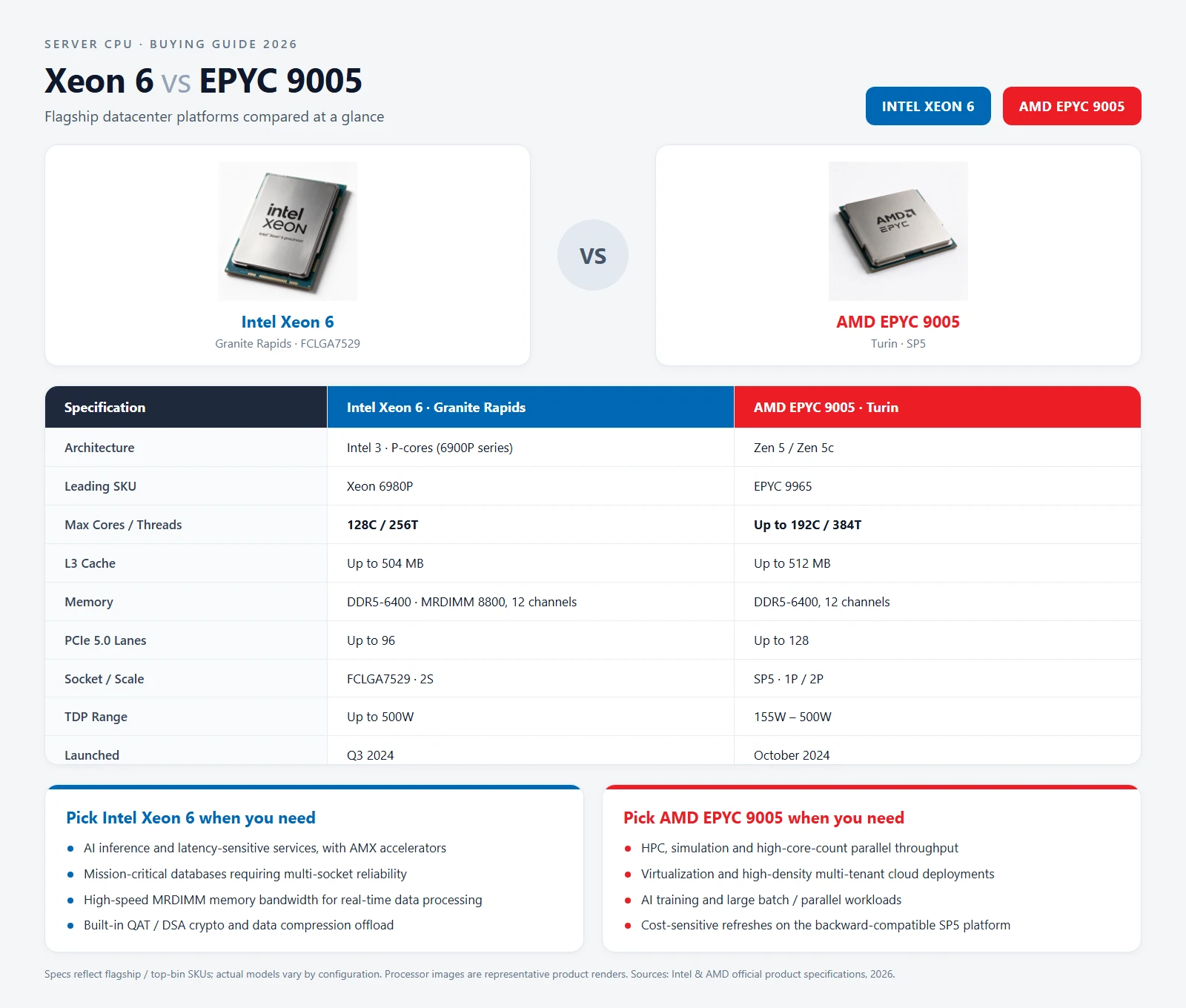
Quick answer: EPYC 9005 is the natural shortlist when core density and 12-channel memory per socket lead the requirement. Xeon 6 is the broader family choice when you need specific P-core, E-core or MRDIMM platform options. Neither is universally faster or cheaper. For an existing fleet, socket, motherboard, BIOS and chassis compatibility decide the answer before benchmarks do. For a new deployment, compare complete nodes — CPU, memory, power, licensing and expansion — then quote the exact Intel sSpec or AMD OPN.
A “Xeon 6 vs EPYC 9005” spreadsheet usually starts with the biggest core count and ends with a price column. That is where bad purchases begin. Xeon 6 covers several materially different platforms, while EPYC 9005 mixes Zen 5 and density-optimised Zen 5c models. The family maximum is not the specification of the CPU on your quote.
This guide compares the platforms the way a procurement team should: by workload, memory and I/O requirements, deployment constraints and total cost.
Start with the platform family, not the family maximum
Intel's Xeon 6 product documentation spans mainstream P-core, high-end P-core and E-core platforms. AMD's EPYC overview covers Zen 5 and Zen 5c models on SP5. These are the ceilings, not a promise that every SKU supports every feature:
| Platform | Core approach | Maximum core count | Memory channels | Socket |
|---|---|---|---|---|
| Xeon 6 6500P / 6700P | P-core, with hyper-threading | Up to 86 | 8 | LGA4710 |
| Xeon 6 6900P | High-end P-core | Up to 128 | 12 | LGA7529 |
| Xeon 6 6700E | E-core, no hyper-threading | Up to 144 | 8 | LGA4710 |
| EPYC 9005 | Zen 5 or Zen 5c, with SMT | Up to 192 | 12 | SP5 |
Two buying rules follow immediately. A Xeon 6900P is not a drop-in upgrade for a 6700P motherboard, and a 192-core EPYC 9965 is not a meaningful price benchmark for a 32-core EPYC 9335. Compare the actual SKU and the actual server platform.
Also treat memory speed separately from channel count. DDR5 and MRDIMM support depend on the processor, board, BIOS and QVL. MRDIMM is not a generic faster label to add to an RDIMM order.
Which platform fits which workload?
Use benchmarks from your own software stack whenever possible. Until then, this is a sensible first shortlist:
| Workload | Start by evaluating | Why |
|---|---|---|
| Dense virtualisation and containers | EPYC 9005 Zen 5c, Xeon 6 E-core | High core density can consolidate nodes, but per-core licensing may change the economics |
| Frequency-sensitive databases and applications | EPYC F-series, Xeon 6 P-core | Boost behaviour, cache, memory latency and licence costs matter more than maximum core count |
| General enterprise compute | Xeon 6 P-core, EPYC 9005 Zen 5 | Balanced frequency, memory and expansion; existing operational familiarity is valuable |
| AI host / GPU server | Either platform, matched to the GPU and fabric | PCIe topology, memory population, storage and NIC placement can matter more than CPU benchmarks |
| Memory-bandwidth-sensitive work | 12-channel platforms and validated MRDIMM options | Channel population and supported module type directly affect usable bandwidth |
For AI servers, do not select the CPU in isolation. An eight-GPU chassis needs a validated CPU–PCIe switch–NIC–storage topology. More CPU cores do not compensate for a platform that cannot feed the accelerators or connect the required network adapters.
For databases and ERP, check licensing before choosing density. A processor that reduces hardware cost per node can still increase software cost if the application is licensed per core.
Memory channels change the BOM, not just bandwidth
EPYC 9005 provides 12 memory channels per socket. Xeon 6 6900P also reaches 12, while 6500P/6700P and 6700E platforms use 8. That difference affects both bandwidth and how you populate the server.
A lower-channel platform does not automatically lose, and a 12-channel platform does not automatically deliver a benchmark improvement. Check three things:
- Balanced population. Plan modules per channel and per socket. An attractive capacity quote can become a poor configuration if the modules cannot be distributed evenly.
- Module capacity and slot budget. Higher-capacity RDIMMs reduce the number of slots needed, but 96GB, 128GB and 3DS parts require explicit platform support.
- Rated speed at the final population. DPC, rank and module type can change training speed. The QVL and board manual matter more than the highest number in a vendor presentation.
If memory bandwidth is the bottleneck, compare the validated module configuration alongside the CPU. Our DDR5 RDIMM bulk buying guide covers rank, speed bins and full-population testing. For existing hardware, the platform QVL should be attached to the RFQ, not checked after delivery.
A realistic SKU shortlist from the current stock list
The following rows are procurement shortlists, not claims of benchmark equivalence. They show how to compare similar buying tiers without using a flagship price as the family price.
| Buying tier | Xeon 6 example | EPYC 9005 example | What to verify |
|---|---|---|---|
| 32-core general compute | Xeon 6530P — 32C/64T, 225W | EPYC 9335 — 32C/64T, 210W | Frequency, licence tier, platform cost and availability |
| 64-core balanced node | Xeon 6761P — 64C/128T, 350W | EPYC 9555 — 64C/128T, 360W | Sustained load, memory population and expansion |
| 96-core dense node | Xeon 6972P — 96C/192T, 500W | EPYC 9655 — 96C/192T, 400W | Socket difference, chassis cooling and software licensing |
| Maximum-density option | Xeon 6980P — 128C/256T, 500W | EPYC 9965 — 192C/384T, 500W | Zen 5c workload fit, per-core licensing and full-node economics |
The 96-core row illustrates the platform trap: Xeon 6972P uses LGA7529, while the lower-core 6500P/6700P examples use LGA4710. The EPYC examples use SP5. These are not interchangeable parts even when the core counts look similar.
Use the full sSpec or OPN on the purchase order. The model name gets you to the right family; the part number identifies the stock you are actually buying.
Total cost: compare nodes over their service life
CPU acquisition cost is only one line. A useful platform comparison looks more like this:
Three-year platform cost = hardware + energy and cooling + software licences + support + logistics + expected spare stock
For hardware, include the motherboard or chassis difference, the final memory population, required heatsinks and any PCIe or networking changes. For energy, use measured or validated sustained power rather than assuming TDP is the electricity bill. For software, model the licence metric actually used by your application.
Rack density can reverse a simple unit-price result. Consolidating several older nodes into fewer high-density nodes may save rack space and operational overhead, but only if the workload scales efficiently and the licence model does not punish the additional cores.
Likewise, a pulled CPU can reduce acquisition cost without reducing performance, but only when condition, stepping, platform validation and warranty evidence are clear. Do not assume current-generation pulled stock is always available; price the condition you can actually source.
Compatibility checks before approving the purchase
Whether you are refreshing a fleet or building new nodes, put these checks on the approval sheet:
- Socket and motherboard: LGA4710, LGA7529 and SP5 are different platforms.
- BIOS and firmware: the board must support the exact processor and stepping before installation.
- Thermal design: confirm the heatsink, VRM, airflow and chassis limits against sustained operation.
- Memory QVL: verify module type, rank, capacity, population and rated speed.
- PCIe topology: map GPU, NIC, RAID/HBA and NVMe devices to the available root complexes and slots.
- Operational compatibility: confirm management tools, images, drivers, monitoring and spares procedures.
For SP5 fleets, EPYC 9004 and 9005 share the socket family, but “same socket” is not a universal drop-in guarantee. The server manufacturer still controls BIOS support and the validated configuration list.
For Xeon fleets, the 6900P move to LGA7529 is a platform change. Budget the board and chassis work rather than treating it as a CPU-only upgrade.